
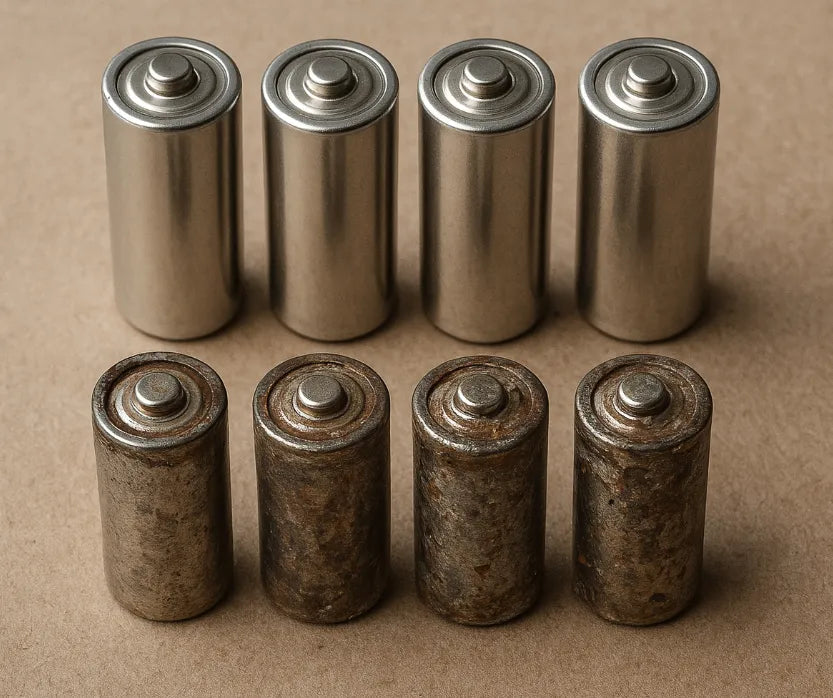
Die Lebensdauer von Laptops hat sich verbessert, doch die Akkus bleiben ihr schwächstes Glied. Da ältere Modelle weiterhin für Arbeit, Musikproduktion, Retro-Gaming und Industrieanwendungen genutzt werden, ist die Nachfrage nach Ersatzakkus stark gestiegen. Viele Online-Marktplätze bieten mittlerweile „neue alte Lagerbestände“ (NOS) von Laptop-Akkus an – Akkus, die vor zehn Jahren hergestellt, aber nie geöffnet wurden. Auf den ersten Blick wirken diese Akkus attraktiv. Sie versprechen Originalqualität und Kompatibilität, die Akkus von Drittanbietern oft nicht erreichen.
Doch ein genauerer Blick offenbart eine komplexere Realität. Lithium-Ionen-Akkus altern auch dann, wenn sie nicht benutzt werden, und dieser Alterungsprozess schreitet unbemerkt in versiegelten Verpackungen fort. Ein Akku, der 2014 oder 2015 hergestellt wurde, kann zehn Jahre lang in einem Lager verbracht haben, in dem Temperatur, Luftfeuchtigkeit und Ladezustand nie kontrolliert wurden. Der Verkäufer mag das Produkt als „fabrikneu“ bewerben, doch die Chemie hält nicht an.
Verbraucher stehen vor einer einfachen, aber entscheidenden Frage: Ist ein zehn Jahre alter, unbenutzter Akku noch funktionsfähig oder Elektroschrott, der nur darauf wartet, auszufallen? Diese Frage ist wichtig, da gealterte Lithiumzellen einen Großteil ihrer Kapazität verlieren, Schwierigkeiten haben können, die Ladung zu halten, oder sogar aufquellen können. Aufquellen kann interne Komponenten beschädigen, das Laptop-Gehäuse verformen und in seltenen Fällen ein Sicherheitsrisiko darstellen.
Das Interesse an NOS-Akkus wächst stetig. Viele Nutzer glauben, dass Originalakkus der Hersteller besser funktionieren als moderne Nachrüstakkus, deren Qualität je nach Marke stark variiert. Einige NOS-Akkus liefern zwar akzeptable Ergebnisse, die meisten weisen jedoch deutliche Leistungseinbußen auf. Da Käufer die Alterungsprozesse von Lithiumzellen nicht kennen, gehen sie unvorbereitet auf den Markt. Die Folge sind Geldverschwendung, eine verkürzte Gerätelebensdauer oder unnötige Sicherheitsrisiken.
Was passiert mit Lithium-Laptop-Akkus über 10 Jahre?
Lithium-Ionen-Akkus altern auf zwei Arten: durch Ladezyklen und durch natürliche Alterung . Selbst wenn ein Akku nie in einem Laptop verbaut wird, beginnt sich die chemische Zusammensetzung ab dem Zeitpunkt der Produktion zu verändern. Dieser Alterungsprozess verläuft langsam, ist aber unvermeidbar. Nach zehn Jahren ist der Einfluss so groß, dass sich das Verhalten, der Ladevorgang und die Energiespeicherung des Akkus verändern.
Chemische Alterung vs. zyklische Alterung
Zyklische Alterung tritt auf, wenn ein Akku wiederholt verwendet und aufgeladen wird. Die meisten Laptop-Akkus sind für 300 bis 1000 Ladezyklen ausgelegt, bevor ihre Kapazität auf etwa 80 % der ursprünglichen Kapazität sinkt. Zehn Jahre alte „NOS“-Akkus (New Old Stock) fallen jedoch selten aufgrund von Ladezyklen aus. Ihr Ausfall ist vielmehr auf chemische Alterung zurückzuführen, die unabhängig von der Nutzung auftritt.
Bei längerer Lagerung zersetzen sich interne Komponenten. Der Elektrolyt wird instabiler. Die Festelektrolyt-Grenzschicht (SEI) verdickt sich. Diese Veränderungen erhöhen den Innenwiderstand und verringern die Ladungsmenge, die die Zellen sicher speichern können. Forscher des IEEE beschreiben diesen Prozess als einen „zeitabhängigen Ausfallmechanismus“, der sich in warmen Umgebungen beschleunigt.
Wie viel Kapazität eine Batterie im Laufe eines Jahrzehnts verliert
Die meisten Lithium-Ionen-Zellen verlieren bei Lagerung bei Raumtemperatur jährlich 2–4 % ihrer Kapazität. Dieser Kapazitätsverlust erhöht sich deutlich, wenn die Batterie voll geladen gehalten oder in einem warmen Lagerhaus aufbewahrt wird.
Wissenschaftliche Tests zeigen:
- Bei 25 °C kann eine Zelle, die ein Jahr lang gelagert wurde und zu 100 % geladen blieb, etwa 20 % ihrer Kapazität verlieren.
- Bei 40°C steigt dieser Verlust im gleichen Zeitraum auf 35%–40% .
- Selbst unter idealen Bedingungen sinkt die Kapazität der meisten Lithium-Laptop-Akkus innerhalb von 10 Jahren auf 50 bis 70 Prozent ihrer ursprünglichen Kapazität.
Das bedeutet, dass eine originalverpackte OEM-Batterie aus dem Jahr 2014 möglicherweise nur die Hälfte ihrer Nennlaufzeit erreicht. Viele liefern sogar noch weniger, insbesondere bei Lagerung unter unkontrollierten Bedingungen.
Selbstentladung und Zersetzung im Laufe der Zeit
Lithium-Ionen-Akkus entladen sich langsam selbst. Ein verschlossener Akku kann monatlich 3–5 % seiner Ladung verlieren. Sinkt die Spannung zu stark ab, können sich im Inneren der Zelle Kupfer-Shunts bilden. Diese mikroskopisch kleinen Verbindungen verursachen interne Kurzschlüsse, die die Leistung dauerhaft mindern.
Die Zersetzung des Elektrolyten ist ein weiterer, oft unbemerkter Alterungsfaktor. Der Elektrolyt transportiert Ionen zwischen den Elektroden. Nach zehn Jahren nimmt seine Effizienz ab, wodurch sowohl die Kapazität als auch die sichere Ladegeschwindigkeit sinken. Deshalb lassen sich viele zehn Jahre alte Batterien nur schwer über 60–80 % aufladen oder verweigern sogar ganz den Ladevorgang.
Warum Langzeitlagerung das Schwellungsrisiko erhöht
Alternde Lithiumzellen produzieren Gase wie Kohlendioxid und Kohlenmonoxid. Neue Batterien können Spuren dieser Gase vertragen, ältere jedoch nicht. Da die Dichtungen mit der Zeit schwächer werden, führen selbst geringe interne Druckänderungen zu einer Ausbeulung des Akkus.
Reparaturwerkstätten berichten Folgendes:
- Viele Batterien, die älter als 8–10 Jahre sind, weisen bereits bei Nichtgebrauch ein frühes Aufquellen auf.
- Durch das Aufquellen können Trackpads verformt, Tastaturen angehoben und interne Rahmen beschädigt werden.
- In seltenen Fällen kann anhaltender Druck zu einem gefährlichen Versagen führen.
Katastrophale Ereignisse sind zwar selten, das Risiko steigt jedoch mit zunehmendem Alter der Batterien – insbesondere wenn diese voll geladen gelagert oder Hitze ausgesetzt waren.
Die Rolle der Lagerbedingungen
Nicht alle zehn Jahre alten Batterien altern gleich. Ein Akku, der bei 40 % Ladung in einer klimatisierten Umgebung gelagert wird, altert langsam. Ein anderer, der in einem Lagerhaus mit 35 °C Sommertemperaturen aufbewahrt wird, altert hingegen schnell.
Ideale Lagerbedingungen umfassen:
- Temperatur: 15 °C bis 20 °C
- Ladezustand: 40 %–60 %
- Luftfeuchtigkeit: Unter 65 %
- Minimale Temperaturschwankungen
Leider bieten die meisten online angebotenen NOS-Batterien keine Informationen zu ihrer Lagergeschichte. Verkäufer beziehen sie oft aus großen Liquidationsbeständen. Die Verpackung sieht zwar sauber aus, aber die Zellen im Inneren können jahrelang Hitzewellen oder Spannungseinbrüchen ausgesetzt gewesen sein.
Innerer Widerstand: Der versteckte Leistungskiller
Ein Jahrzehnt chemischer Alterung erhöht den Innenwiderstand. Ein höherer Widerstand verringert die Leistungsfähigkeit einer Batterie unter Last. Laptops mit älteren Batterien weisen häufig folgende Merkmale auf:
- Bei starker Belastung abschalten.
- Senken Sie den Prozentsatz sofort von 30 % auf 5 %.
- Schwierigkeiten, eine stabile Spannung aufrechtzuerhalten
- Langsam laden oder den Ladevorgang mittendrin abbrechen.
Ein höherer Widerstand erhöht auch die Wärmeabgabe beim Ladevorgang und belastet den Akku dadurch zusätzlich.
Die praktischen Ergebnisse von 10 Jahren Alterung
Nach zehn Jahren weist ein Lithium-Ionen-Laptop-Akku – egal ob benutzt oder unbenutzt – typischerweise folgende Schäden auf:
- Erheblicher Kapazitätsverlust
- Erhöhter Innenwiderstand
- Größere Ladeinstabilität
- Höheres Risiko von Schwellungen
- Höhere Wahrscheinlichkeit eines frühen Versagens
Einige NOS-Batterien funktionieren zwar noch, aber nur wenige verhalten sich wie eine neue, frisch hergestellte Batterie. Die Alterung ist in ihrer chemischen Zusammensetzung begründet.
Sind neue, unbenutzte Laptop-Akkus aus altem Lagerbestand sicher und zuverlässig?
„Neue alte Lagerware“ (NOS) klingt beruhigend. Der Begriff suggeriert Originalqualität, unberührten Zustand und Leistung auf Herstellerniveau. Viele Käufer gehen davon aus, dass NOS-Akkus besser sind als moderne Akkus von Drittanbietern, da sie zur Produktionszeit des Laptops gefertigt wurden und oft höherwertige Zellen enthielten. Doch das Alter verändert alles. Zehn Jahre chemischer Alterung machen jeden Vorteil der ursprünglichen Konstruktion in der Regel zunichte.
Was NOS im Batteriemarkt wirklich bedeutet
NOS (New Old Stock) bezeichnet Produkte, die vor Jahren hergestellt, aber nie verkauft oder verwendet wurden. Diese Artikel stammen häufig aus Reparaturwerkstätten, von Händlern oder aus Lagerhäusern, die alte Bestände auflösen. Die Verpackung kann versiegelt und das Produkt neuwertig aussehen, doch die Zellen im Inneren sind unbemerkt gealtert.
Manche Verkäufer deklarieren gebrauchte oder nur leicht entladene Batterien fälschlicherweise als neuwertig (NOS). Andere kaufen palettenweise alte Lagerbestände auf Auktionen, ohne zu wissen, wie lange diese unkontrolliert gelagert wurden. Diese mangelnde Transparenz setzt Käufer dem Risiko unvorhersehbarer Batteriezustände aus.
Warum „unbenutzt“ nicht gleichbedeutend mit „gesund“ ist
Lithium-Ionen-Akkus verlieren auch ohne Benutzung an Kapazität. Der Elektrolyt zersetzt sich langsam, und die SEI-Schicht verdickt sich. Nach zehn Jahren kann selbst ein Akku, der in seiner Originalverpackung gelagert wurde, die Hälfte seiner nutzbaren Kapazität verloren haben.
Diese Alterung ist äußerlich nicht erkennbar. Ein Akku kann makellos aussehen, aber nur noch wenige Minuten Laufzeit bieten. Reparaturwerkstätten berichten häufig, dass neue, unbenutzte Akkus aus den frühen 2010er-Jahren sich genauso verhalten wie stark beanspruchte Akkus aus dieser Zeit.
In vielen Fällen schaltet sich der Laptop unter Last ab, weil die Akkus Stromspitzen nicht verkraften. Ein hoher Innenwiderstand, ein häufiges Problem bei älteren Akkus, führt zu Spannungsabfällen, wenn das System Strom anfordert.
Erfahrungsberichte von Reparaturtechnikern und Aufbereitern
Techniker, die ältere Laptops reparieren, stoßen regelmäßig auf neue, gebrauchte Akkus. Ihre Beobachtungen weisen übereinstimmende Muster auf:
- Die meisten NOS-Batterien, die älter als 8–10 Jahre sind, weisen einen Kapazitätsverlust von 30–70 % auf.
- Viele fallen innerhalb weniger Wochen aus, weil sie keine stabile Spannung aufrechterhalten können.
- Akkus, die jahrelang voll geladen gelagert wurden, kommen oft aufgequollen an oder beginnen kurz nach dem Einbau aufzuquellen.
- Manche Laderegler weisen gealterte Zellen zurück und verhindern den Ladevorgang vollständig.
Diese Beobachtungen stimmen mit veröffentlichten Labordaten überein, die zeigen, dass Lithium-Ionen-Zellen auch dann eine Degradation aufweisen, wenn sie nicht benutzt werden.
Sicherheitsrisiken, die man nicht sehen kann
Während NOS-Batterien selten zu katastrophalen Ausfällen führen, sind sie anfälliger für Probleme, die durch interne Gasbildung und instabile chemische Zusammensetzung verursacht werden.
Zu den häufigsten Risiken gehören:
- Aufquellen: Durch die Gasbildung wird die Zelltasche gedehnt und gegen den inneren Rahmen des Laptops gedrückt.
- Instabilität beim Laden: Ältere Zellen erzeugen beim Laden mehr Wärme, was die Belastung des Akkus erhöht.
- Spannungsschwankungen: Unregelmäßige Spannung kann die Stromversorgung des Laptops belasten.
Ein aufgeblähter Akku kann das Gehäuse verformen, das Trackpad beschädigen oder gegen die Hauptplatine drücken. Selbst wenn der Akku nicht platzt, können die entstandenen Schäden kostspielig sein.
Leistungsprobleme, die NOS unzuverlässig machen
Selbst wenn eine NOS-Batterie sicher erscheint, kann ihre Leistung dennoch unzureichend sein:
- Schnellere Entladung als normal
- Kürzere Laufzeit als Alternativen aus dem Nachrüstmarkt
- Plötzliche Sprünge im Akkuprozentsatz
- Abschaltungen während grafik- oder rechenintensiver Aufgaben
- Langsames Laden und unvollständige Ladezyklen
Häufig stellen Anwender fest, dass eine moderne Ersatzbatterie aus den Jahren 2023–2025 eine bessere Leistung erbringt als eine originale OEM-Batterie aus dem Jahr 2014, einfach weil die neuere Batterie von einer moderneren chemischen Zusammensetzung profitiert.
Der umwelt- und rechtlich relevante Aspekt
Der Verkauf von zehn Jahre alten Lithiumbatterien als „neu“ kann gegen lokale Verbraucherschutzgesetze verstoßen. In manchen Regionen fallen veraltete Lithiumakkus auch unter die Gefahrgutvorschriften, wenn sie Anzeichen von Aufblähung oder Auslaufen aufweisen.
Aus ökologischer Sicht sollten gebrauchte Batterien in schlechtem Zustand eher als Elektroschrott denn als wiederverwendbare Lagerbestände eingestuft werden. Die Wiedereinführung chemisch degradierter Akkus in den Umlauf erhöht Abfall und Risiken.
Wann NOS noch funktionieren kann – aber selten
Es gibt seltene Fälle, in denen NOS-Batterien fast wie neu funktionieren. Diese Ausnahmen betreffen typischerweise Folgendes:
- Kontrollierte Lagertemperaturen
- Teilladungsniveaus
- Vom Hersteller abgedichtete Umgebungen
- Zellqualität in Industriequalität
Diese Bedingungen sind jedoch ungewöhnlich. Die meisten online erhältlichen NOS-Batterien stammen aus unvorhersehbaren Lieferketten ohne Lagerhistorie.
Fazit: NOS ist in der Regel unzuverlässig.
Ein zehn Jahre alter, unbenutzter Laptop-Akku kann das System zwar mit Strom versorgen, erreicht aber fast nie die Leistung eines neuen Akkus. Zu den Risiken gehören Kapazitätsverlust, vorzeitiges Aufblähen, instabiles Laden und mögliche Schäden am Laptop.
In den meisten Fällen sind NOS-Batterien eher mit Elektroschrott als mit funktionsfähigen „neuen“ Bauteilen vergleichbar.

Wie man echte, brauchbare, lange gelagerte Batterien erkennt
Nicht jede alte Batterie ist unbrauchbar. Ein kleiner Prozentsatz lange gelagerter Akkus bleibt stabil, sofern sie unter optimalen Bedingungen aufbewahrt wurden. Die Herausforderung besteht darin, diese seltenen, funktionstüchtigen Akkus von defekten oder unsicheren zu unterscheiden. Da Online-Angebote oft keine Informationen zur Lagerhistorie enthalten, müssen sich Käufer auf Sichtprüfungen, Datumsangaben, Spannungsindikatoren und das Verhalten des Verkäufers verlassen. Dieses Kapitel erklärt praktische Methoden, um das Risiko zu minimieren, eine defekte, zehn Jahre alte Batterie zu erwerben.
Prüfen Sie zuerst den Herstellungsdatumscode.
Jeder Laptop-Akku trägt einen Datumscode, dessen Formate sich jedoch je nach Hersteller unterscheiden. Wenn Sie wissen, wie Sie diese Nummern interpretieren, können Sie besser einschätzen, ob der Akku noch brauchbar ist.
Gängige Formate sind:
- JJ-MM-TT oder JJJJ-MM
- Losnummer mit Kalenderwoche (z. B. 1432 = Kalenderwoche 32 des Jahres 2014)
- Proprietäre Codes , bei denen die ersten Ziffern Jahr und Woche angeben.
Ist die Batterie älter als acht bis zehn Jahre, ist Vorsicht geboten. Verweigert der Verkäufer die Angabe eines genauen Herstellungsdatums, ist dies ein Warnsignal. Seriöse Anbieter geben üblicherweise das Herstellungsjahr an, um realistische Erwartungen zu wecken.
Prüfen Sie den physischen Zustand vor der Installation.
Selbst eine unbenutzte Batterie kann frühe Anzeichen von innerer Belastung aufweisen. Eine kurze Sichtprüfung kann Probleme aufdecken, die die Batterie unsicher machen.
Suchen:
- Leichte Ausbeulung um das Etikett oder den Deckel herum.
- Spalten zwischen den Gehäusenähten
- Verformter Kunststoff in der Nähe der Zellkompartimente
- Korrosion um Anschlüsse oder Schraubpunkte
- Ungewöhnliche Gerüche , die auf einen Elektrolytverlust hindeuten können.
Das Aufquellen beginnt typischerweise im Inneren und wird sichtbar, sobald sich Druck aufbaut. Jede Anzeichen einer Verformung bedeuten, dass die Batterie nicht eingebaut werden sollte.
Überprüfen Sie die Leerlaufspannung
Besitzen Sie ein Multimeter? Die Leerlaufspannung (OCV) liefert wertvolle Informationen. Lithium-Ionen-Akkus weisen üblicherweise eine monatliche Selbstentladung von 7–15 % auf, abhängig vom Laderegler. Nach zehn Jahren Lagerung sollte der Akku nicht gefährlich entladen sein, sofern keine Störung vorliegt.
Eine intakte, unbenutzte Batterie sollte folgende Werte anzeigen:
- 10,8 V bis 11,4 V für einen 3-Zellen-Akku
- 14,4 V bis 15,6 V für einen 4-Zellen-Akku
Liegt der Messwert deutlich unter diesen Bereichen, ist der Akku wahrscheinlich tiefentladen. Tiefentladene Akkus fallen in der Regel innerhalb weniger Tage aus oder schwellen nach den ersten Ladezyklen rapide an.
Stellen Sie Verkäufern die richtigen Fragen
Seriöse Händler legen Wert auf Transparenz hinsichtlich der Herkunft ihrer Produkte. Durch gezielte Fragen lässt sich feststellen, ob der Händler Erfahrung im Umgang mit Batterien hat.
Hilfreiche Fragen sind beispielsweise:
- „Wann und wo wurde diese Batterie gelagert?“
- „Welcher Herstellungsdatumscode steht auf dem Etikett?“
- Wurde die Batterie in einem temperaturkontrollierten Lager aufbewahrt?
- „Bieten Sie Rückgaben an, wenn die Auslastung unter 70–80 % liegt?“
Verkäufer, die vage Antworten geben oder die Lagerbedingungen nicht ansprechen, greifen in der Regel auf Liquidationsware mit unbekannter Qualität zurück.
Vermeiden Sie Angebote mit verdächtigen Formulierungen.
Bestimmte Beschreibungen werden häufig im Zusammenhang mit minderwertigen oder defekten NOS-Batterien verwendet. Folgende Formulierungen sollten vermieden werden:
- "Ungetestet"
- „Im Lager gefunden“
- „Sieht neu aus, wird aber im Ist-Zustand verkauft.“
- „Elektronikartikel sind vom Umtausch ausgeschlossen.“
Diese Beschreibungen deuten auf ein Risiko hin. Eine zehn Jahre alte Batterie sollte niemals ohne grundlegende Prüfung verkauft werden.
Vergleich von NOS-, generalüberholten und neu hergestellten Ersatzbatterien
Die folgende Tabelle fasst die Stärken und Schwächen jeder Option zusammen.
Vergleichstabelle
| Akku-Typ | Vorteile | Schwächen | Typischer Zustand |
|---|---|---|---|
| Neuware aus altem Lagerbestand (NOS) | Teile in Erstausrüsterqualität; perfekte Passform | Hohe Alterung, verminderte Kapazität, Schwellungsrisiko | Unvorhersehbar |
| Renoviert | Geprüfte Zellen, aktualisierte Elektronik | Gemischte Zellursprünge; nicht immer konsistent | Mäßige Zuverlässigkeit |
| Neuer Aftermarket (2023–2025) | Frische Zellen, stabile Chemie, gute Laufzeit | Die Qualität variiert je nach Marke. | Oft das beste Preis-Leistungs-Verhältnis |
| Gebraucht OEM | Bewährte Kompatibilität | Verschleiß durch Zyklen, kürzere Restlebensdauer | Hängt von der Nutzungshistorie ab |
Moderne Nachrüst-Akkus, die nach 2022 hergestellt wurden, sind NOS-Akkus in der Regel überlegen, da sie von neuen Materialien und optimierten Fertigungsprozessen profitieren. Qualitätshersteller verwenden zudem Sicherheitsschaltungen, die den aktuellen Standards entsprechen und so das Risiko von Instabilitäten verringern.
Verwenden Sie die Akku-Gesundheitsprüfung nach der Installation
Wenn Sie sich für den Einsatz einer neuen, unbenutzten Batterie (NOS) entscheiden, testen Sie diese sofort. Verwenden Sie dazu beispielsweise folgende Werkzeuge:
- Windows:
powercfg /batteryreport - Linux:
upower -ioderacpi - macOS: Systeminformationen > Energie
Es kann die volle Ladekapazität, die Anzahl der Ladezyklen und das Ladeverhalten messen. Ein gesunder Akku sollte mehrere Ladezyklen ohne plötzliche Leistungsabfälle durchlaufen.
Wenn der Akku bei den ersten Tests durchfällt, senden Sie ihn umgehend zurück. Die chemische Zersetzung verschlimmert sich in der Regel in den ersten zwei Wochen der Nutzung rasch.
Warnsignale, die bedeuten: „Nicht verwenden“
Verwenden Sie den Akku nicht mehr, wenn Sie Folgendes feststellen:
- Schnelle Schwellung
- Plötzliche Abschaltung unter mäßiger Last
- Unregelmäßige Ladeniveaus
- Überschüssige Wärme beim Laden
- Brennender oder süßlicher chemischer Geruch
Jedes dieser Symptome deutet auf eine innere Zersetzung hin, die zu einem Sicherheitsrisiko werden könnte.
Kluge Entscheidungen treffen – Wann kaufen, wann vermeiden und bessere Alternativen
Der Kauf eines zehn Jahre alten Laptop-Akkus ist selten einfach. Manche NOS-Akkus funktionieren noch, viele verhalten sich aber direkt nach dem Einbau wie verschlissene Akkus. Um die richtige Entscheidung zu treffen, ist es wichtig zu wissen, wann diese alten Akkus noch brauchbar sind und wann sie ein Risiko darstellen.
Wann eine 10 Jahre alte Batterie noch akzeptabel sein könnte
Es gibt wenige Ausnahmefälle, in denen NOS-Batterien ein gutes Preis-Leistungs-Verhältnis bieten. Diese Fälle sind selten, aber möglich.
NOS kommt nur dann infrage, wenn:
- Der Laptop wird für Aufgaben mit geringem Risiko verwendet, wie z. B. das Ausführen von Offline-Software oder das Betreiben älterer Geräte.
- Der Akku wird nur als Notstromversorgung verwendet, nicht für den täglichen mobilen Gebrauch.
- Der Verkäufer kann kontrollierte Lagerbedingungen , wie z. B. Temperaturen unter 20°C, eindeutig bestätigen.
- Sie benötigen ein OEM-Paket für Industrie-, Medizin- oder Diagnosegeräte, bei denen Nachrüstoptionen nicht kompatibel sind.
- Der Preis ist deutlich niedriger als der einer brandneuen Ersatzbatterie.
Auch dann sollten diese Batterien sofort getestet werden. Eine stabile NOS-Batterie mag für leichte Aufgaben eine akzeptable Leistung erbringen, verhält sich aber nicht wie eine neue Batterie.
Wenn NOS unsicher oder unwirtschaftlich wird
Die meisten zehn Jahre alten Batterien fallen in diese Kategorie. Wenn einer der folgenden Punkte zutrifft, sollte die Batterie unbedingt vermieden werden:
- Der Laptop wird für die tägliche mobile Arbeit , zum Streamen oder Spielen verwendet.
- Die Anzeige enthält Formulierungen wie „wie besehen“, „ungetestet“ oder „keine Rückgabe“.
- Die Batterie wurde unter unbekannten oder hohen Temperaturbedingungen gelagert.
- Es gibt keine Anzeichen von Schwellungen oder Gehäuseablösung.
- Die Leerlaufspannung liegt weit unterhalb des erwarteten Bereichs.
- Sie verlassen sich auf den Laptop für wichtige Aufgaben , die eine stabile Stromversorgung erfordern.
Unter diesen Umständen verhalten sich NOS-Batterien eher wie Elektroschrott als wie nützliche Bauteile. Ihre Leistung ist unberechenbar, und das Risiko des Aufblähens steigt nach den ersten Ladezyklen rapide an.
Warum neue Batterien aus dem Zubehörhandel oft die bessere Wahl sind
Moderne Ersatzbatterien, die zwischen 2023 und 2025 hergestellt werden, sind aus mehreren Gründen oft leistungsfähiger als zehn Jahre alte Originalbatterien:
- Frischere Chemikalien und höherwertige Separatoren reduzieren den Innenwiderstand.
- Die Hersteller verwenden aktualisierte Sicherheitsschaltungen , die den aktuellen Normen entsprechen.
- Die Kapazitätserhaltung ist weitaus höher, da die Zellen keinem langfristigen chemischen Zerfall unterlagen.
- Die Preise sind wettbewerbsfähig, insbesondere für gängige Laptop-Marken wie HP, Lenovo, Dell und ASUS.
Ein guter Ersatzakku bietet in der Regel 80–100 % der ursprünglichen Laufzeit und hält mehrere hundert Ladezyklen. Das ist deutlich besser als die Leistung der meisten neuen Akkus.
Markenreputation ist wichtig
Nicht alle Aftermarket-Marken sind gleichwertig. Hochwertige Anbieter verwenden kalibrierte Zellen von renommierten Herstellern und führen vor der Montage eine Spannungsanpassung durch. Billigere Marken verzichten auf diese Schritte, was zu schlechter Leistung oder vorzeitigem Ausfall führt.
Wählen Sie Ersatzbatterien von Herstellern, die für ihre gleichbleibende Fertigungsqualität, ihren zuverlässigen Garantieservice und ihre verständliche Dokumentation bekannt sind. Vermeiden Sie Produkte ohne Datenblatt oder Herstellerangaben.
Was tun mit unsicheren oder beschädigten Batterien?
Sollten Sie eine aufgeblähte oder beschädigte NOS-Batterie finden, werfen Sie diese bitte nicht in den Hausmüll. Lithiumbatterien gelten in den meisten Ländern als Sondermüll.
Befolgen Sie die Schritte zur sicheren Entsorgung:
- Legen Sie die Batterie in einen nicht brennbaren Behälter.
- Vermeiden Sie es, es zu durchstechen oder zu verbiegen.
- Bringen Sie es zu einer zertifizierten Sammelstelle für Elektroschrott oder einer Batterierecyclingstation .
- Viele Elektronikgeschäfte nehmen Lithiumbatterien kostenlos zum Recycling an.
Eine sachgemäße Entsorgung verhindert das Austreten von Chemikalien, Brandgefahren und Umweltverschmutzung.
Bewährte Vorgehensweisen beim Kauf von Laptop-Akkus ab 2025
Egal ob Sie sich für Nachrüstteile oder Originalteile entscheiden, befolgen Sie diese Richtlinien, um auf der sicheren Seite zu sein und kostspielige Fehler zu vermeiden:
- Überprüfen Sie das Herstellungsdatum .
- Bevorzugen Sie Batterien mit klaren Garantie- und Rückgabebedingungen.
- Prüfen Sie nach Möglichkeit die Lagerbedingungen.
- Verwenden Sie Systemtools, um nach der Installation einen Batteriezustandsbericht zu erstellen.
- Tauschen Sie jeden Akku aus, der frühzeitig aufquillt oder einen schnellen Kapazitätsverlust aufweist.
- Ersatzbatterien sollten bei einem Ladezustand von 40–60 % an einem kühlen Ort gelagert werden.
Diese Maßnahmen verlängern die Akkulaufzeit und schützen den Laptop vor Beschädigungen.
Fazit: NOS oder Elektroschrott?
Die meisten zehn Jahre alten Laptop-Akkus sind eher Elektroschrott als funktionsfähige Neuware. Chemische Alterung ist selbst bei optimaler Lagerung unvermeidbar. Eine kleine Minderheit der NOS-Akkus (New Old Stock) bleibt stabil, benötigt aber saubere Lagerbedingungen, intakte Spannung und eine sorgfältige Sichtprüfung.
Für die meisten Nutzer ist ein neu gefertigter Akku aus dem Zubehörhandel die sicherere und wirtschaftlichere Wahl. Er bietet eine verlässliche Leistung, verbesserte Sicherheitsfunktionen und eine längere Lebensdauer. Dieses Verständnis hilft Verbrauchern, unnötige Risiken zu vermeiden und Entscheidungen zu treffen, die sowohl ihre Geräte als auch ihre eigene Sicherheit schützen.
